AN ENORMU SOLUTIONS PRODUCT · eSCHEDULER

eSchedulerSelect available work intervals faster.

When schedule intervals are released, every second matters. eScheduler helps you refresh, scan, and select the intervals that match your setup—without manually clicking through every available box.

⚡ Fast interval selection ⚙ Fully customizable ▦ Multi-campaign support
Schedule intervals
Ready
Campaign Agero
Selection window 7:00 AM – 7:30 PM
Mon
Tue
Wed
Thu
8:00
✓
✓
✓
8:30
✓
—
✓
✓
9:00
✓
✓
9:30
✓
✓
—
✓
Auto refresh Watching for release…
Preset loaded My preferred schedule
Fast Processes available intervals quickly during release windows.
Flexible Choose campaigns, hours, days, breaks, and selection behavior.
Consistent Save your preferred setup and reuse it whenever you need it.
A shift selector designed around how you actually choose shifts

More control. Less repetitive clicking.

Set your preferences once, then let the scheduler handle the repetitive work of finding and selecting intervals that fit your rules.

Fast interval selection

Quickly checks the visible availability grid and selects matching intervals, helping you respond faster when shifts are released.

Multi-campaign support

Switch between supported campaigns while automatically applying the appropriate hours of operation. Release windows are detected separately from the latest Schedule Releases data so campaign selection does not interfere with release timing.

Custom selection windows

Narrow your selection to the hours you actually want instead of selecting every available interval across the full campaign day.

Break-time configuration

Skip specific break times or use pacing rules to avoid building a schedule that does not match how you want to work.

Skip days and intervals

Exclude complete days or specific times so the scheduler focuses only on the schedule you are willing to accept.

Custom presets

Save and load your own configurations for different schedule goals. Presets sync across your devices for the same licensed Starmatic account, and deleted presets are removed across synced devices instead of returning later.

Automatic refresh tools

Keep the supported scheduling page active, automatically detect new release windows, and react at the correct time without relying on continuous clock polling.

Ignore swap-granted intervals

Keep previously swapped-away or granted intervals from being treated as part of the schedule you are currently trying to build.

Pay-period estimates

View current and previous pay-period hours and estimated payment information. Estimates continue updating in both Started and Stopped modes and sync across the user's own devices.

Commitment Adherence

Track Pay Cycle and Rolling 30-Day Commitment Adherence. Only intervals actually observed as checked become commitments, future intervals are excluded, and the 48-hour removal and swapped-grant rules are respected.

Release-ready automation

Automatically detects the latest Initial 10 Hours and Cap Lift release times, can start the scheduler before a detected release when it was stopped, return it to the stopped state afterward, and preserve the page session so the scheduler is ready when release time arrives.

Keep Awake

While the scheduler is running, eScheduler keeps the computer and display awake to help prevent sleep, screen dimming, or the display turning off during active scheduling. Normal power-management behavior resumes when the scheduler stops.

Inside the extension

Everything is controlled from one compact popup.

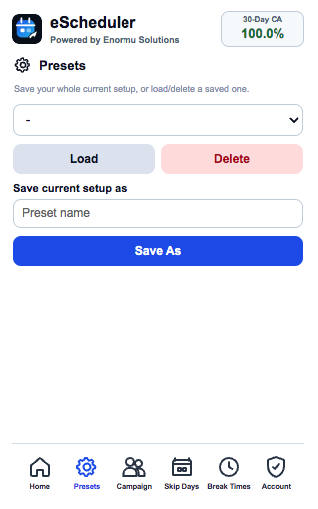
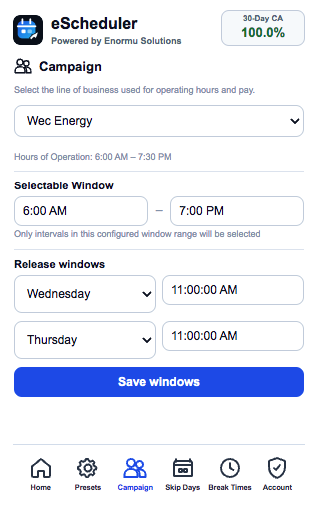
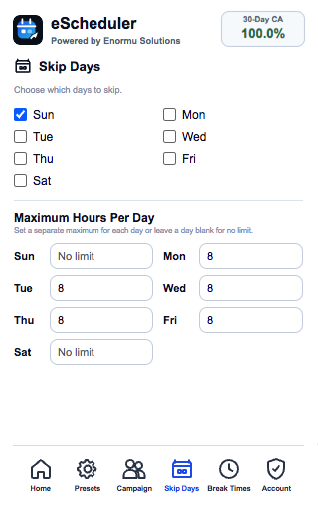
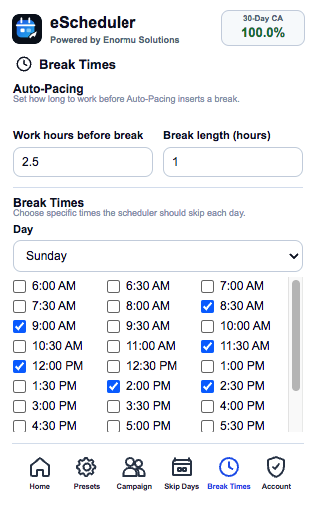
These are actual screenshots of eScheduler. Switch between Home, Presets, Campaign, Skip Days, Break Times, and License without leaving the toolbar popup.
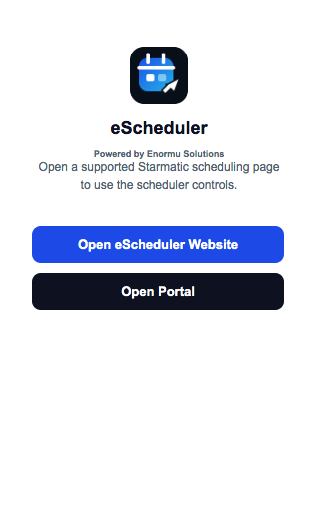
eScheduler popup outside supported Starmatic pages showing links to eScheduler and Arise websites
Outside StarmaticA simple fallback view with quick links when the active page is unsupported.
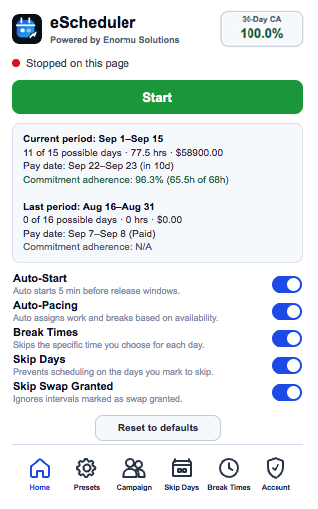
eScheduler Home tab showing scheduler status, pay-period estimates, Commitment Adherence, toggles, and navigation
HomeStatus, pay estimates, CA, and the main scheduler controls.
eScheduler Presets tab showing saved preset selection and save controls
PresetsSave, load, and remove synchronized scheduler configurations.
eScheduler Campaign tab showing campaign selection, operating hours, and release windows
CampaignCampaign hours plus automatically detected release-window information.
eScheduler Skip Days tab showing selectable days of the week
Skip DaysChoose entire days the scheduler should avoid.
eScheduler Break Times tab showing Auto-Pacing work and break lengths and per-day skip times
Break TimesConfigure Auto-Pacing and specific times to skip each day.
Simple workflow

Set your rules, open Starmatic, and let eScheduler assist.

The scheduler does not decide your work life for you. You define the campaign, days, hours, breaks, and other preferences. It then applies those preferences to the intervals available on the page.

01

Choose your campaign

Select the supported campaign and confirm its schedule-release settings.

02

Customize your availability

Set your preferred window, skip days, break times, pacing, and other options.

03

Run the scheduler

When intervals appear, the tool checks and selects the ones that match your configuration.

04

Save the setup as a preset

Keep your configuration for the next release or create different presets for different goals.

Real selection results

See what the scheduler actually selects.

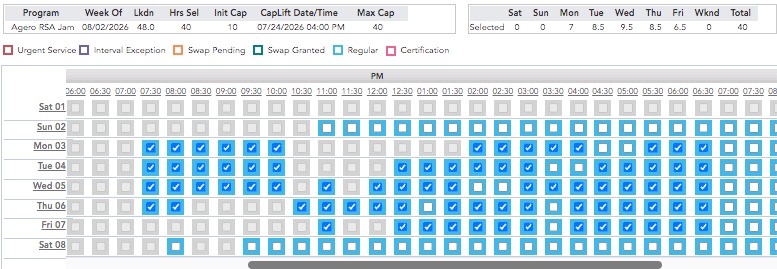
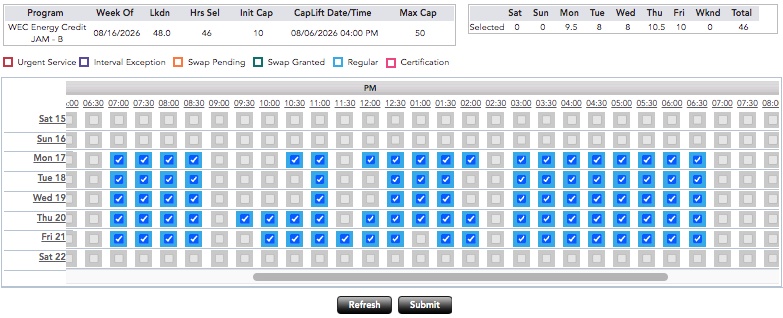
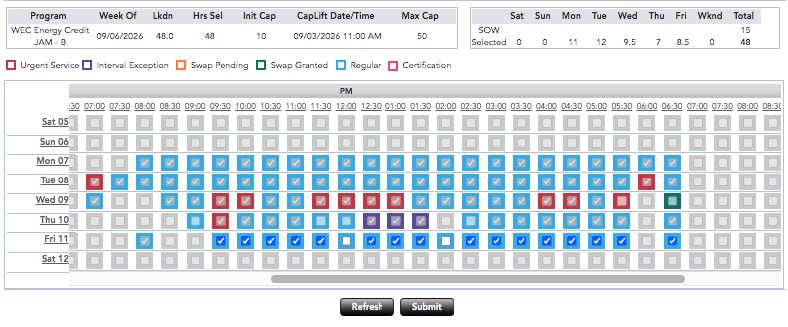
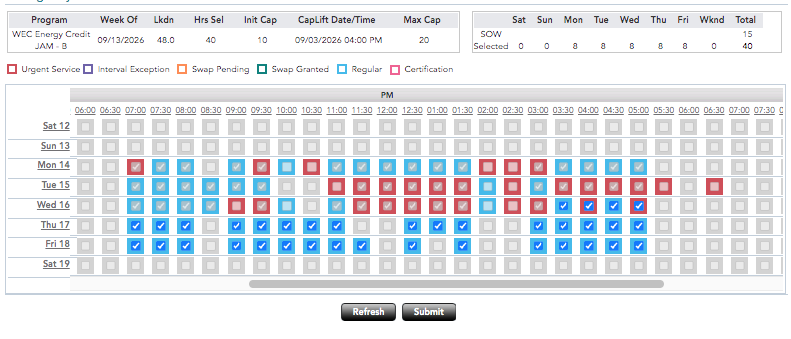
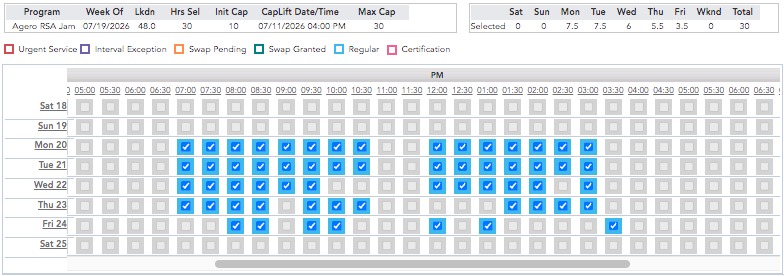
Screenshots from live subscriber accounts after a release window closed — actual selected intervals, not a mockup.
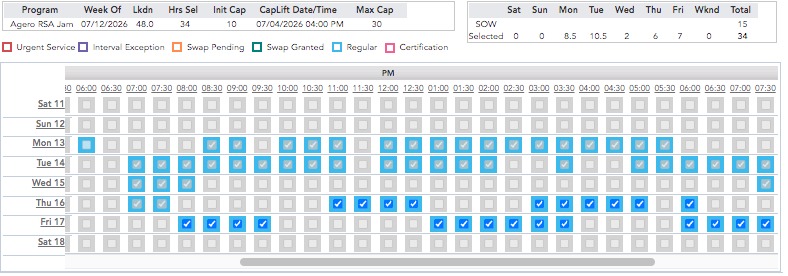
Agero RSA Jam schedule for the week of July 12, showing 34 of 48 available hours selected
Agero RSA Jam Week of Jul 12 · 34 hrs selected
Agero RSA Jam schedule for the week of July 19, showing all 30 available hours selected
Agero RSA Jam Week of Jul 19 · 30 hrs selected
Agero RSA Jam schedule for the week of August 2, showing all 40 available hours selected
Agero RSA Jam Week of Aug 2 · 40 hrs selected
WEC Energy Credit JAM-B schedule for the week of August 16, showing 46 hours selected
WEC Energy Credit JAM-B Week of Aug 16 · 46 hrs selected
WEC Energy Credit JAM-B schedule for the week of September 6, showing 48 hours selected
WEC Energy Credit JAM-B Week of Sep 6 · 48 hrs selected
WEC Energy Credit JAM-B schedule for the week of September 13, showing 40 hours selected
WEC Energy Credit JAM-B Week of Sep 13 · 40 hrs selected
See the speed in action

Watch real release selections happen in seconds.

These short recordings show eScheduler responding during the Initial 10 Hours release and the Cap Lift, using live Starmatic schedule pages.

Initial 10 Hours Release See how quickly the scheduler moves from the release screen into interval selection when the initial release opens. ⚡ Real selection recording
Cap Lift Release Watch the scheduler react when the cap increases and additional schedule capacity becomes available. ⚡ Real selection recording
Why subscribers use it

Manual clicking is slow when everyone is competing for the same intervals.

eScheduler reduces the repetitive work between seeing available intervals and selecting the ones that fit your schedule. It gives you a faster, repeatable process while keeping your preferences under your control.

Without the tool
  • Refresh the page manually
  • Watch release dates and times yourself
  • Select available intervals one at a time
  • Keep track of your target hours yourself
  • Remember break times and days to skip
  • Rebuild scheduling preferences repeatedly
  • Calculate expected pay yourself
  • Work out Commitment Adherence yourself
With eScheduler
  • Automatic refresh options
  • Automatically detects release dates and times
  • Automatically selects all allowed intervals
  • Stops automatically when your target is reached
  • Break Times and Skip Days apply automatically
  • Save and reuse scheduling presets
  • Built-in pay estimate from selected hours
  • Pay Cycle and Rolling 30-Day CA tracking
Access plans

Choose the payment schedule that works for you.

Access follows fixed renewal dates. The Pay-Cycle plan is not sold as a guaranteed number of usage days.

Monthly

Monthly Access

JMD 11,000per month

Renews on the 9th or 24th of each month.

Already have a license? Open the setup page to install and activate eScheduler.
Don’t have a license? Contact us using the WhatsApp button on this page to get started.
Important:

eScheduler helps automate interval selection, but it cannot guarantee that shifts will be available or that every selection attempt will succeed. Availability remains first come, first served and is controlled by the third-party scheduling platform.